DOM Manipulation and Website Templating
12/20/2025
During the earlier days of my website, only the homepage was designed while the rest were seemingly left for dead. Every page is now designed as of v1.0, but if you look at its html file, there's nothing in some of the parts. How? This is one of the magic of using JavaScript through DOM manipulation.
Table of Content
Document Object Model
Document Object Model (or DOM for short) is a programming interface for documents. Its how the document is represented so programs can change its structure, style and content. It is constructed as a tree of Objects depending on how you placed your elements. Consider the following code block:
<!DOCTYPE html>
<html lang="en">
    <head>
        <meta charset="UTF-8">
        <meta name="viewport">
        <title>Document</title>
    </head>

    <body>
        <header>Title</header>

        <div id="content">
            <h2>The word is the bird</h2>
            <p>
                Did you know the word? The word
                that is the bird?
            </p>
        </div>

        <footer>
            <a href="https://pieisspy.neocities.org/" target="_blank"
            rel="noopener noreferrer">Cool Website!</a>
        </footer>
    </body>
</html>
If we were to represent this as a DOM tree, it would look more or less something like this:
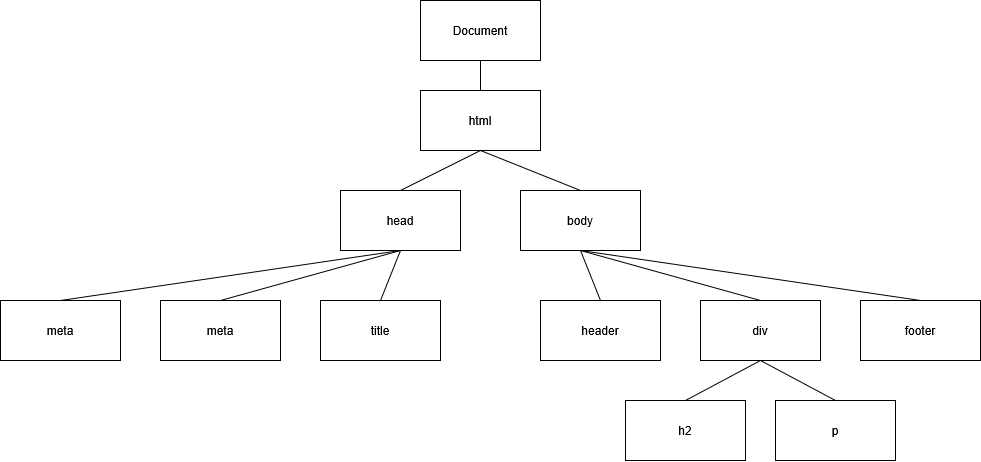
This is a simplified version of a DOM tree. In reality, the elements in this tree would have attributes attached to it, like this (tree generated by this website):
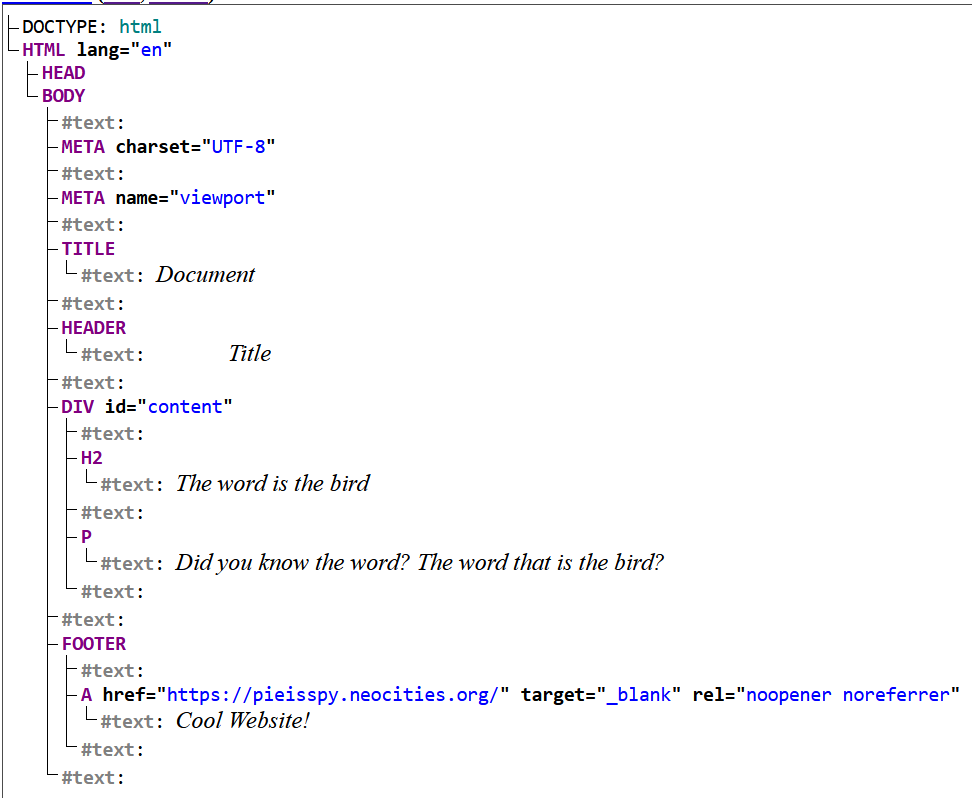
As you can see, the DOM tree also stores the element's attributes and its child text content. You can also notice that there are a lot of empty text children in it. DOM also stores the whitespaces of the html file, which is why we fix formatting issues in HTML through CSS or manually remove the said format in the HTML file itself. For this blog, this is a topic out of our scope.
Common DOM Manipulation Methods in JavaScript
These are the methods that we will be using for this tutorial:
/*
    querySelector() finds the first instance of the stated css selector
    in the html element it's being called on

    querySelectorAll() finds all instances of the stated css selector
    in the html element it's being called on
*/
element.querySelector(selector)
element.querySelectorAll(selectors)

/*
    createElement() creates the stated html tag element
*/
document.createElement(tagName)

/*
    appendChild() appends a child into a parent node
*/
parentNode.appendChild(childNode)

/*
    setAttribute() sets the attribute of the element into the given value
*/
element.setAttribute(attribute, value)

/*
    ----Not used, but is nice to know----
    removeChild() removes the child from a parent and returns said child,
    while remove() just straights up deletes it from the DOM
*/
parentNode.removeChild(child)
element.remove()
Of course, since a DOM is an object, it contains more methods and attributes than just these methods listed here. You can find the full list here.
Implementation of Templating
In order to do our implementation (or at least that's how I did it), its important to already have a template in mind. My suggestion for this is to hard code the template that you want to use and style it early on, then implement it to the other pages so that the only thing you have to do is to import both CSS and JS files into your HTML file for the template to load (for example, template first the home page, then implement it for the rest of the pages).
Going back to our code block, we already have a header and a footer that we want to reuse to the other pages (I'm keeping this simple for the new ones reading here). Copy the contents of the header and footer into a safe place for reference, then delete those. You should have something like this:
<header></header>

...

<footer></footer>
Then, we will edit the attributes and text content of the header and footer in the JavaScript file. Lets start with the header. The only thing we need to do here to replicate the original is to first query the header from the HTML DOM and set its textContent to "Title".
function createHeader() {
    const header = document.querySelector("header");
    header.textContent = Title;
}
If we also want to turn it into a link to the home page (assume our home page to be index.html),
then we'd need to add an anchor <a>
tag to store the text content, then append it into the header.
function createHeader() {
    const header = document.querySelector("header");
    const link = document.createElement("a");

    link.textContent = "Title";
    link.setAttribute("href", "index.html");
    header.appendChild(link);
}
We'll be doing the same exact thing for the footer, but this time we want the link to be opened in a new tab and have the rel set to "noopener noreferrer" (since this is an external site, we're preventing tabnabbing and https referrer for privacy).
function createFooter() {
    const footer = document.querySelector("footer");
    const link = document.createElement("a");

    link.textContent = "Cool Website!";
    link.setAttribute("href", "https://pieisspy.neocities.org/");
    link.setAttribute("target", "_blank");
    link.setAttribute("rel", "noopener noreferrer")
    footer.appendChild(link);
}
And that's it! All you need to do now is to call both of these functions in your main function
in the JS file and link both it and your CSS (assuming you've already styled the template before
as said earlier) files into your <head> and all things should be running.
<head>
    <meta charset="UTF-8">
    <meta name="viewport">
    <title>Document</title>
    <link rel="stylesheet" href="style.css">
    <script src="script.js" defer></script>
</head>
This is just one of the most basic example of DOM Manipulation. If you want to implement a navbar section for all
your pages, you can list all your (title page, link) pairs into an array, then for each pair, the script will
create a new anchor <a> tag that has its textContent set to the page, and its href set to the link of the said page
and appends it into the navbar div you've already defined in the HTML file.
Of course, this goes without saying, but the script won't work for users who disabled JS, so only the main content will appear on them. An alternative for this is a static site generator (SSG), which generates an html based on the content and its given templates. This will be a topic for a future day once I've gone through this.
References
- https://www.w3.org/TR/WD-DOM/introduction.html
- https://www.w3schools.com/js/js_htmldom.asp
- https://developer.mozilla.org/en-US/docs/Web/API/Document_Object_Model
- https://www.geeksforgeeks.org/javascript/dom-document-object-model/
- https://developer.mozilla.org/en-US/docs/Learn_web_development/Core/Scripting/DOM_scripting#doing_some_basic_dom_manipulation
- https://www.theodinproject.com/lessons/foundations-dom-manipulation-and-events